How I sped up frame-by-frame seeking in Chromium
How Chromium plays video, why frame stepping repeats decoding work, and how a guarded fast path changes it.

In a video editor, the Next Frame button should show the adjacent image quickly. On a web page, the usual approach is to pause <video>, change currentTime, and wait for seeked. My starting point was S. D. Mikhailyuk’s study of HTMLVideoElement seeking. He was my academic supervisor. His comparison of Chromium and Safari showed a pattern in Chromium: each step took longer until the next keyframe, where the delay dropped sharply. I wanted to find out why.
For a step to the adjacent frame, Chromium followed its normal seek path. It flushed the renderer, moved the demuxer back to a keyframe, and decoded forward to the target. That path handles arbitrary jumps, but with repeated forward steps it does some of the same work on every request.
I prepared a Chromium media pipeline patch, tests, and a benchmark. On the recorded Chromium 146 benchmark set, median seek time fell from 6.8 to 0.3 ms. The patch leaves the HTML API alone: the page still sets currentTime and receives seeked. Chromium takes a different internal path when its current state can serve the target.
Talk recording
Watch from the start of my talk, 12:27.
Problem and motivation
Frame access matters in editing, video annotation, effect previews, and exporting still images. An application gets a frame, processes it, and moves to the next one. When frame processing is cheap, the time spent reaching each frame determines much of the total runtime.
HTML has no standard “next frame” method. The application seeks by time:
video.pause();
const seekFinished = new Promise((resolve) => {
  video.addEventListener('seeked', resolve, { once: true });
});
video.currentTime = targetTime;
await seekFinished;
For constant frame rate video, applications often advance by 1 / fps. This requests a time, not a frame number. With variable frame rates or a complicated container timeline, the calculation alone cannot guarantee the exact image index.
A change from 10.000 to 10.033 seconds looks small in JavaScript. The media pipeline still receives a full seek request. The seeked event arrives after the internal operation has completed.
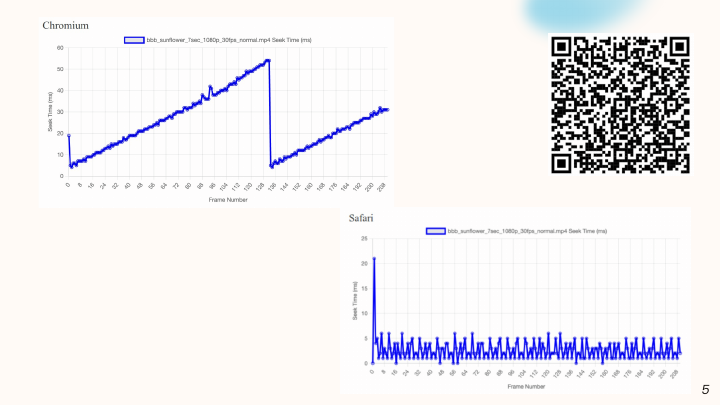
The graph points toward video structure: latency grows and resets at group boundaries. Comparing Chromium with Safari helped locate the problem, but it does not measure my patch. For that, I compare two builds of the same Chromium version below.
A little video theory
Most video uses inter-frame compression. An I-frame can be decoded on its own. A P-frame depends on earlier reference images; a B-frame may depend on images on either side. The frames between keyframes form a Group of Pictures, or GOP.
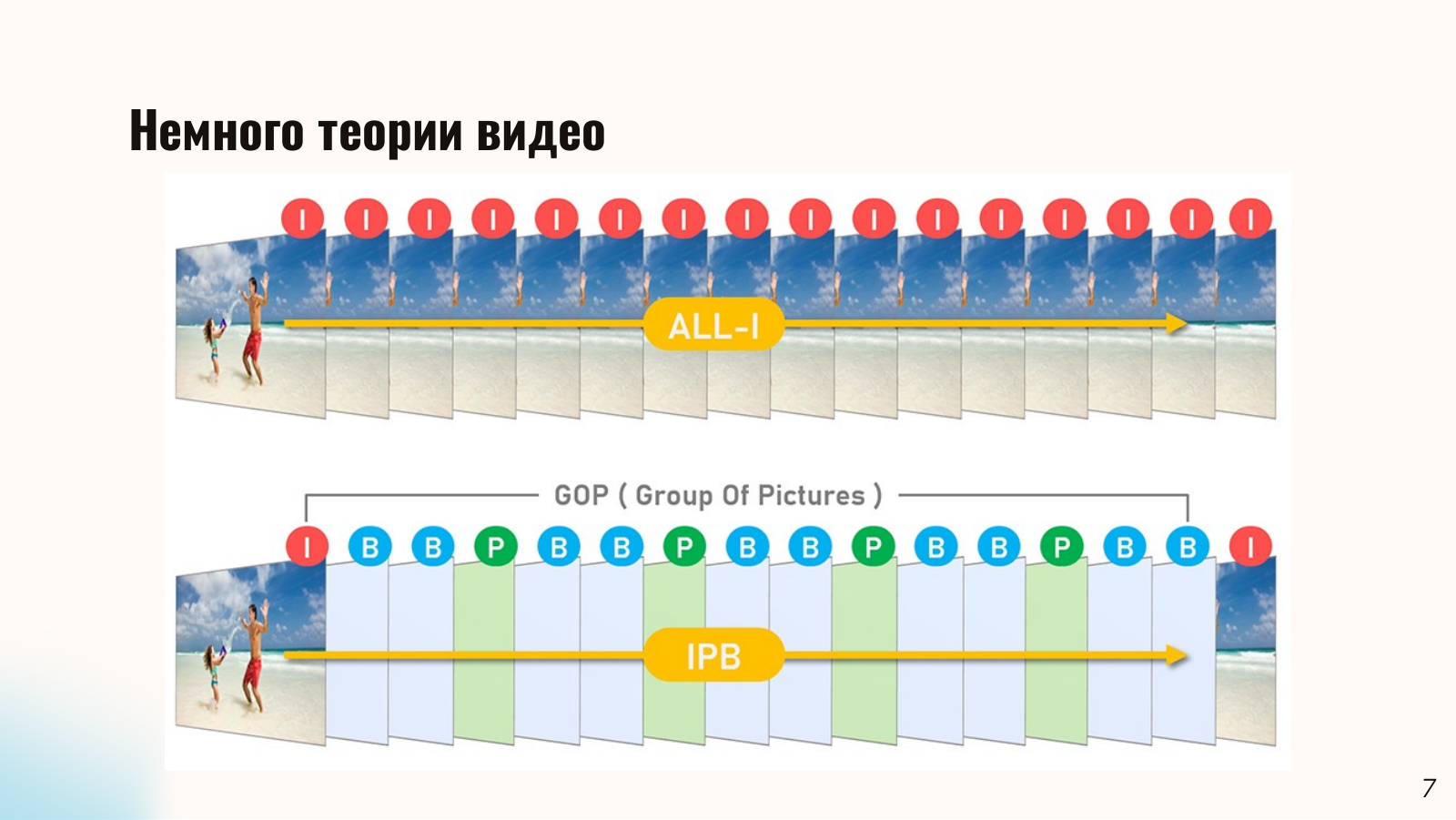
Containers and codecs have different jobs. MP4 stores track, packet, and timing information. A demuxer finds and passes compressed packets to a decoder, which reconstructs images using the packets and reference frames. With B-frames, reading, decoding, and display order can differ. The next packet is not necessarily the next visible frame.
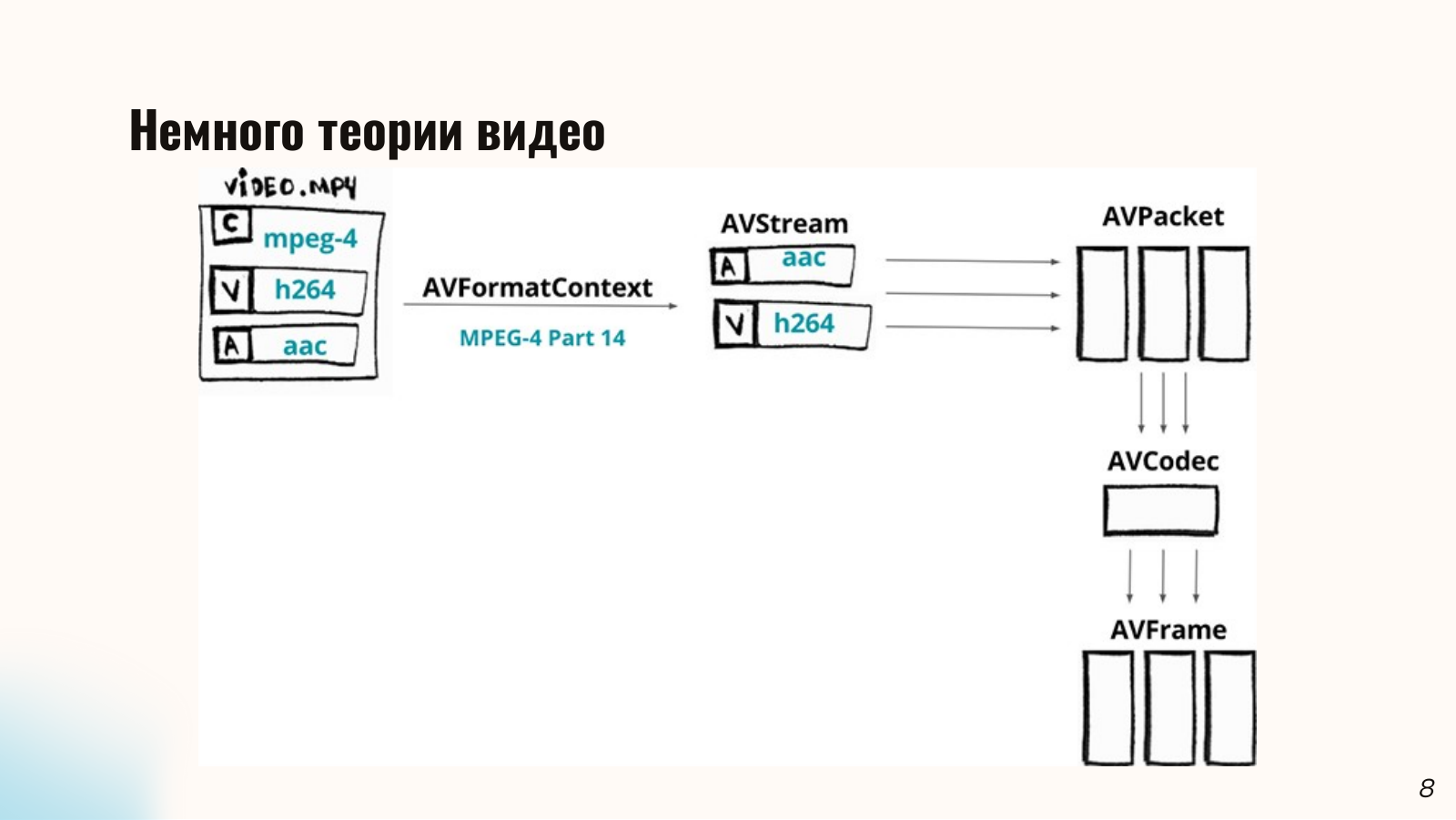
The diagram uses FFmpeg structures for these stages. AVFormatContext describes an open container. Each AVStream represents a track, such as H.264 video or AAC audio. Reading produces compressed AVPacket objects with timestamps. A decoder configured through AVCodec produces AVFrame objects. Packets and ready frames occupy different queues. Having the file in memory does not mean the desired frame has been decoded.
A packet usually has decode and presentation timestamps. With B-frames, the decoder can receive a packet before its image is due on screen. An application can know the exact fps and still has to seek on the media timeline; the pipeline determines which packets and reference images the requested time needs.
After a reset, the decoder must start again at a suitable keyframe and work forward to the target. Within one GOP, the cost of a series of steps can grow like 1 + 2 + 3 and so on. The growth starts over at each GOP boundary, so O(N²) does not describe a whole video traversal. With N steps and an average dependency chain of length G, a rough cost for the standard path is O(N · G). The patch avoids repeatedly traversing that chain for suitable forward steps. New frames still have to be read and decoded. It reduces work per step rather than changing the dependence on the number of steps.
The effect is clearest when keyframes are far apart. Adding keyframes shortens the standard seek path, at the cost of larger files and transcoding the source.
How Chromium plays video
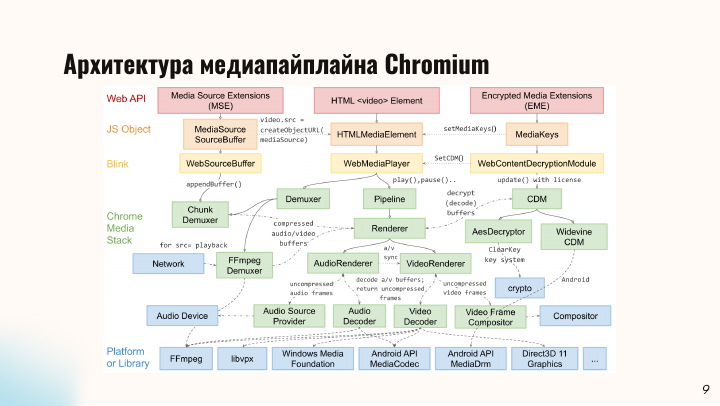
In normal playback, a frame passes through four layers shown in the overview diagram: web APIs, Blink, Chromium’s media stack, and platform libraries. The page works with <video>. The browser reads the container, decodes audio and video, synchronizes them, and passes frames toward the screen.
From the video element to the pipeline
The page calls HTMLVideoElement. Setting a source or changing currentTime sends a command through HTMLMediaElement in Blink. WebMediaPlayerImpl connects the element to the media stack. It starts playback and seeks, then reports readiness back to the element. Once the internal operation finishes, the page receives an event such as seeked. Decoding happens further down the pipeline.
PipelineController orders asynchronous pipeline operations, including start, pause, and seek. PipelineImpl connects the demuxer and renderer and manages state transitions. This is where Chromium decides whether to perform a normal seek or continue from prepared data. The presentation builds this path one component at a time, from HTMLMediaElement through WebMediaPlayer and PipelineImpl to the demuxer and renderer.
From the file to decoded frames
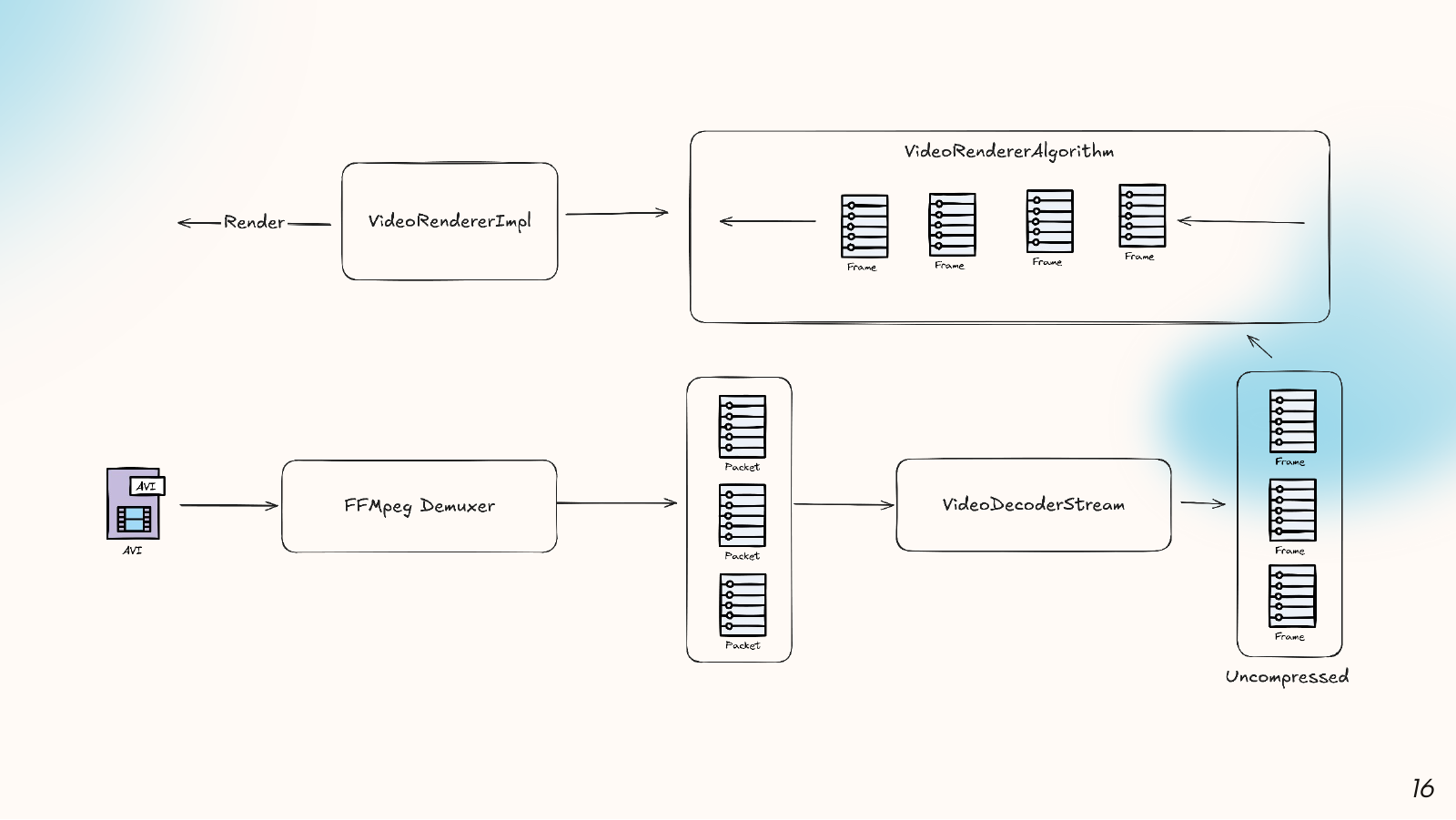
For a file assigned to src, FFmpegDemuxer reads the container and separates its tracks. It puts compressed packets into per-stream queues. Sequential playback keeps reading from the current position; an arbitrary reposition uses av_seek_frame. There is no image yet at this stage. A video packet holds data for a decoder, while an audio packet holds compressed sound.
VideoDecoderStream receives video packets and passes them to a decoder. For H.264, the decoder retains reference images needed for P- and B-frames. Decoder output may arrive after the next request because processing is asynchronous, and decode order need not match display order. Chromium also chooses a decoder implementation according to platform and format. Resetting it discards state already prepared for upcoming frames.
From a ready frame to the screen
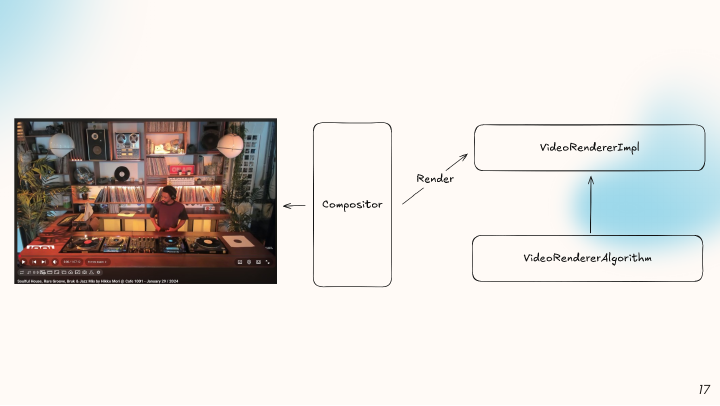
RendererImpl manages media time and coordinates AudioRendererImpl with VideoRendererImpl. Sound and image have to follow the same timeline. VideoRendererImpl requests decoded images and passes them to VideoRendererAlgorithm, where frames wait with their timestamps. The algorithm chooses the image to show now and tracks frames that are early or have been skipped.
The chosen image goes to the compositor for display. When the user requests a new time, an old frame may still be queued while a new one is inside the decoder. A fast seek must discard stale data, wait for a suitable image, and update audio state.
Why the change spans several components
The system has a compressed-packet queue, requests already sent to the decoder, and a queue of ready frames. The demuxer may have read beyond the requested time while the decoder is still processing an earlier request. The video renderer may have a suitable frame while the audio renderer is waiting for data. The fast path has to check each component and report completion only when their states agree.
The overview also shows MSE with ChunkDemuxer and encrypted video with a CDM. They enter the media stack through different paths. The patch below targets regular src playback through FFmpegDemuxer. Other demuxers would need their own safety checks.
DeepWiki for chromium/chromium lets you browse descriptions of the subsystems and follow them to classes and source files. Specific behavior can be checked against Chromium’s media source code and the patch.
Finding the expensive step
For regular src playback, the standard seek path is roughly:
HTMLVideoElement.currentTime
  → WebMediaPlayerImpl
  → PipelineImpl::RendererWrapper::Seek
  → AbortPendingReads
  → Renderer::Flush
  → Demuxer::Seek / FFmpeg av_seek_frame
  → read from a suitable keyframe
  → decode up to the target time
  → seeked
Flush() clears renderer state, and Demuxer::Seek() repositions the stream. This path handles backward seeks, long jumps, and cases where the existing queues cannot be trusted. For a step to the next frame, it discards state that may still be useful: queued packets, decoder reference images, or a ready frame near the target.
The measurements show a sawtooth pattern. Each step gets slower as the target moves farther from a keyframe. Latency drops again at the next keyframe.
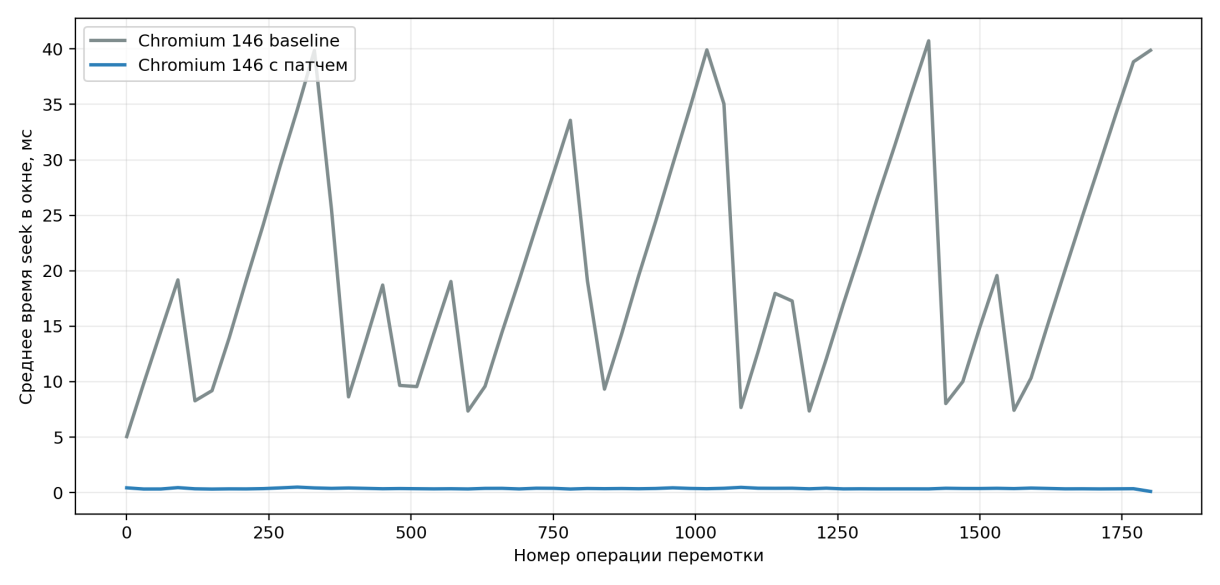
When FFmpeg’s faster option cannot find a suitable position, the AVSeekFrame call moves back to the nearest keyframe. The decoder then works through the dependency chain to reach the requested time. The first step after an I-frame is relatively cheap. Later steps cost more until the next GOP boundary resets the pattern.
The two rows of frames in the presentation show why. In all-I video, nearly every requested image can serve as a starting point. In an IPB stream, the nearest I-frame is the starting point, followed by the P- and B-frames that must be reconstructed. Flushing the decoder on every step repeats work within the same GOP. The JavaScript calculation of targetTime does not explain the graph’s shape.
Other approaches
Two browser methods are worth checking before changing the media pipeline. HTMLMediaElement.seekToNextFrame() sounds suitable, but it is non-standard and deprecated. An application that runs across browsers cannot rely on it. fastSeek(time) lets the browser choose a nearby convenient decode point at the expense of accuracy. Extracting a specific frame requires the precise time requested through currentTime.
Another option is to transcode the video to all-I frames, like the upper row of the GOP diagram. Almost any frame can then be a starting point. This works for a media library prepared in advance. A user-supplied file would need transcoding first, and the result would take more space.
Decoding can also move out of the standard video element. ffmpeg.wasm can read the container and extract frames in WebAssembly, giving the application control over packets, codecs, and filters. The application must load an FFmpeg build and spend its own resources on media processing. That can make sense when the product already needs FFmpeg in the browser. It is a lot of extra machinery for a Next Frame button.
WebCodecs provides VideoDecoder, EncodedVideoChunk, and VideoFrame. In the diagram, the application first demuxes the container and sends compressed chunks to the decoder. WebCodecs does not demux MP4 or WebM. The example code in the slides loads the file into an ArrayBuffer, obtains the video stream, configures VideoDecoder, reads chunks, waits for decoding, and draws a VideoFrame on canvas.
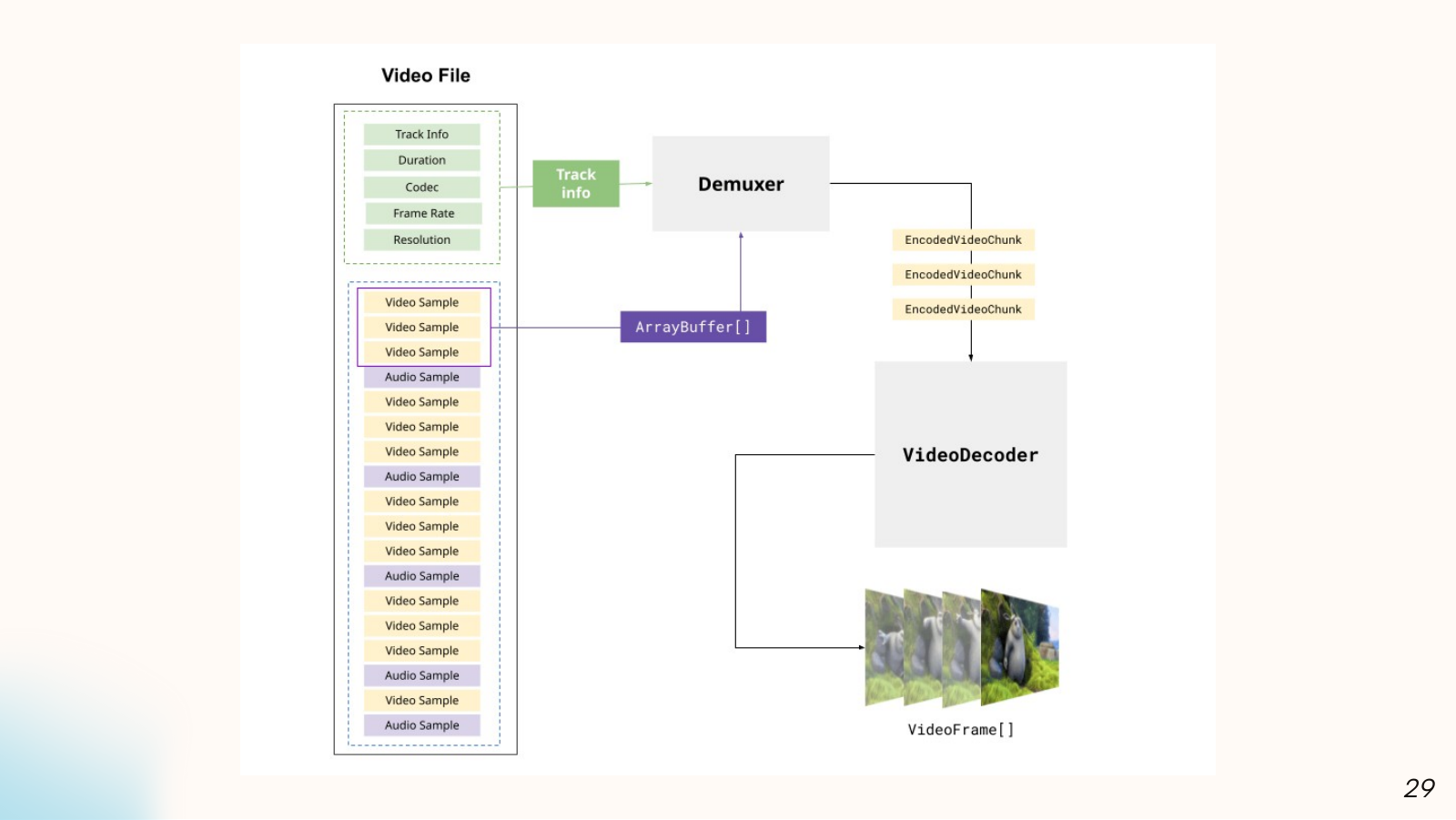
The demonstration could step to the next frame, but several pieces had to work together. The application watches the decoder queue, closes used VideoFrame objects, selects images by timestamp, and decides how to handle sound. Mediabunny helps read and write media containers. It does not make HTMLVideoElement.currentTime cheaper because the application is building a separate pipeline.
Server-side processing can use native FFmpeg, dedicated hardware, and separate worker processes. Each requested frame then consumes server resources and requires data transfer; interactive frame stepping depends on the network. That approach suits batch export or centralized processing. My work focused on local seeking in a video element with an already loaded file.
Other browser engines
In WebKit, HTMLMediaElement::seek() reaches AVPlayerItem through seek(to:toleranceBefore:toleranceAfter:). The tolerance parameters let the system media stack account for seek precision. WebKit has a different media stack and internal contract, so the Chromium patch cannot be applied to it directly.
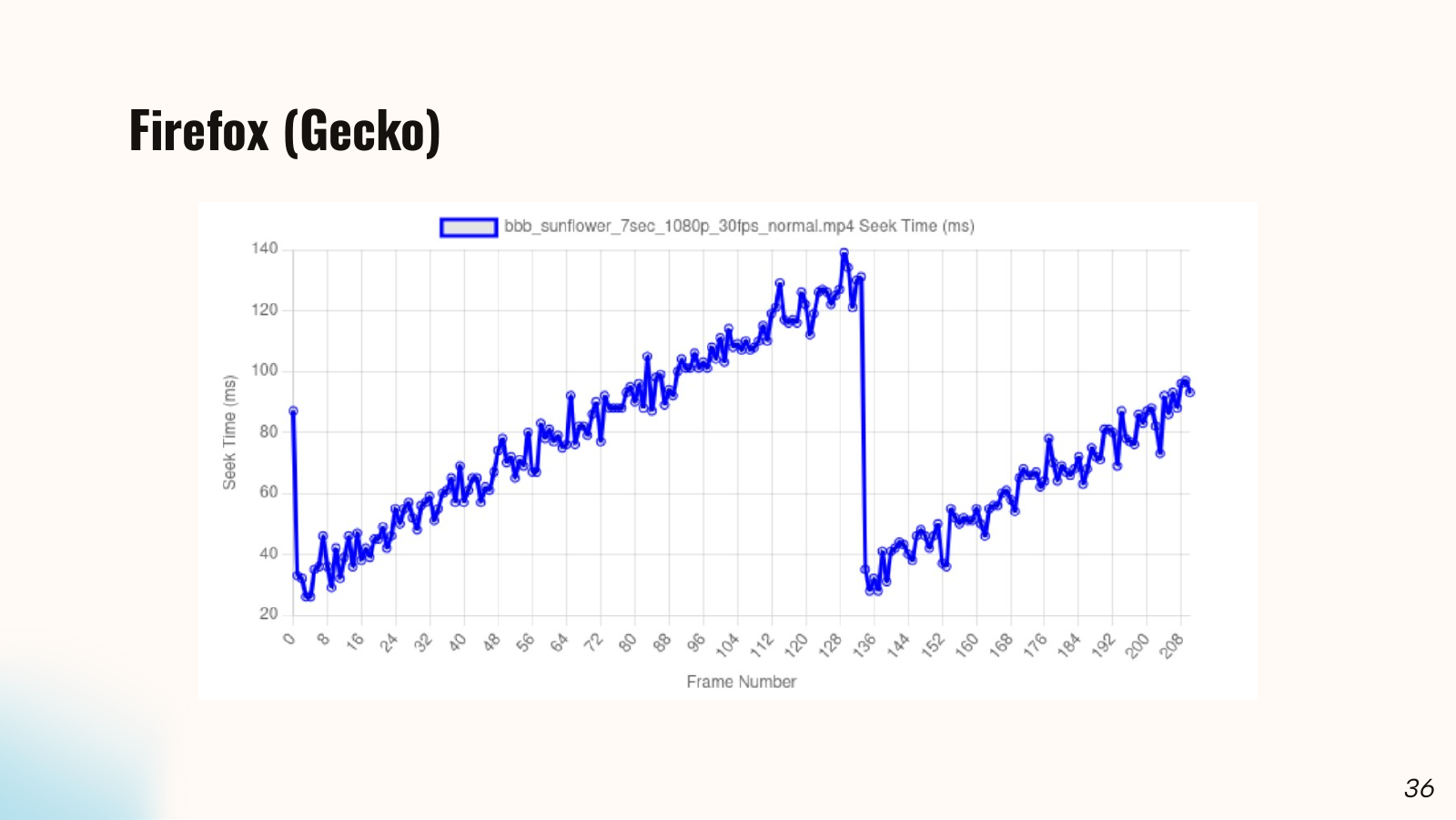
The Firefox graph also rises within a GOP and drops sharply at its boundary. It comes from one video and shows a similar latency shape; it cannot establish how Gecko’s media pipeline is built. Firefox data is not included in the patch speedup calculation.
The patch: choosing a fast path
I put the decision in PipelineImpl::RendererWrapper::Seek(), before the normal Flush() and Demuxer::Seek() sequence. This layer has access to the seek direction, demuxer, and renderer. The demuxer cannot tell whether the renderer is ready. WebMediaPlayerImpl cannot see the packet queue. DecoderStream does not coordinate audio with video. In PipelineImpl, each component can report on its own state.
The decision has three checks:
const bool forward_seek = seek_timestamp >= renderer->GetMediaTime();
const bool demuxer_fast_forward =
    forward_seek && demuxer_->ShouldFastForward(seek_timestamp);
const bool renderer_fast_forward =
    forward_seek && demuxer_fast_forward &&
    renderer->SupportsFastForward(seek_timestamp);

if (forward_seek && demuxer_fast_forward && renderer_fast_forward) {
  renderer->FastForwardTo(
      seek_timestamp,
      base::BindOnce(&RendererWrapper::CompleteFastForwardSeek,
                     weak_factory_.GetWeakPtr(), seek_timestamp));
  return;
}

// The standard path follows.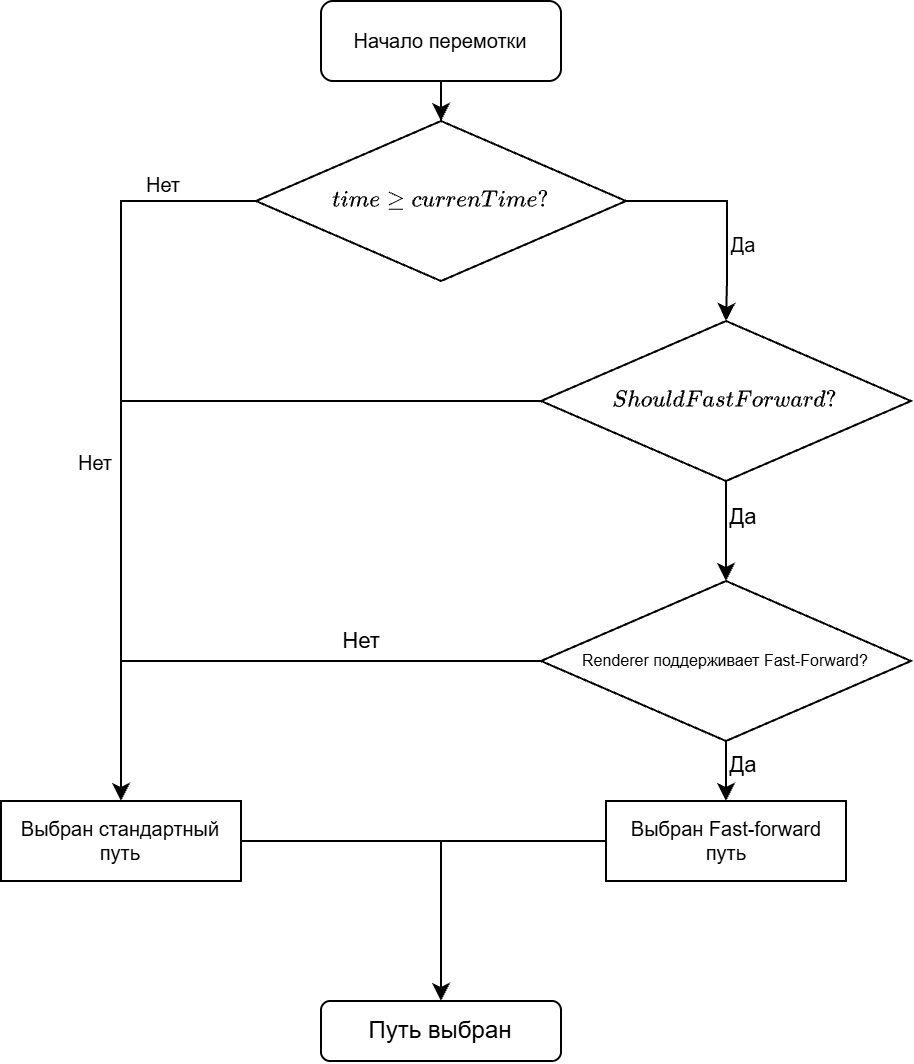
Backward seeks, an unknown read position, and a renderer waiting for data still use the standard path. The base implementation of Demuxer::ShouldFastForward() returns false, so other demuxers do not acquire the new behavior automatically. The public HTML API does not change.
The frame-strip diagram shows two possible jumps. A nearby target can be reached by continuing decoding. For a distant target, reading every intervening frame may cost more than seeking back to a keyframe. ShouldFastForward() checks whether the demuxer can reach the target without repositioning; SupportsFastForward() checks the renderer state.
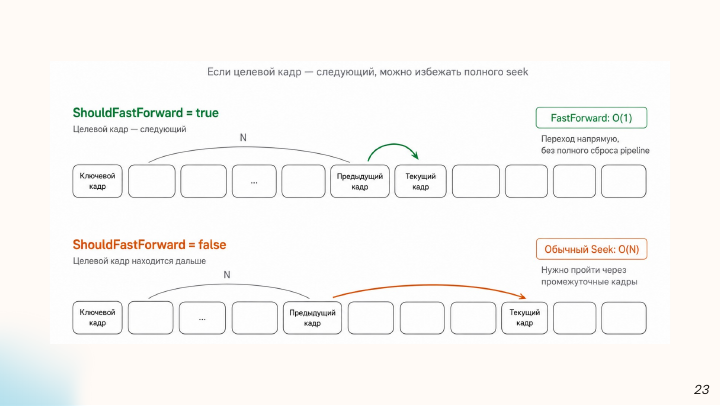
When both checks pass, PipelineImpl calls FastForwardTo() instead of running AbortPendingReads, Flush, and Demuxer::Seek. CompleteFastForwardSeek returns the pipeline to its working state and reports completion. If either check fails, the regular seek runs. Arbitrary currentTime jumps keep their existing behavior.
Checking the demuxer
An early version of my check used buffered ranges. Those ranges show which time intervals have been loaded, but not which packets remain in the demuxer queue. Some packets may already have moved to the decoder. Buffered ranges could not answer the question the fast path needs.
The patch adds DecoderBufferQueue::ContainsTimestamp(). It compares the target timestamp with the first and last packets in the current queue. This checks a timestamp range rather than finding a packet with exactly that time. FFmpegDemuxer::ShouldFastForward() chooses a reference stream, video if available and audio otherwise. If the target falls within the queued range, the demuxer allows reading to continue without another FFmpeg reposition.
If the target is outside that range, the demuxer uses the last read timestamp. The patch accepts targets up to 5 seconds behind the read head or 2 seconds ahead of it. These are heuristic limits for nearby seeks; tuning them would need tests on a wider range of files. If the read position is unknown, the check returns false.
The target can be ahead of the current playback time but behind the demuxer’s read head because packets were read in advance. For a distant target, sequential reading may cost more than a new seek, so the pipeline uses the regular path.
Renderers, decoder, and synchronization
After the demuxer check, RendererImpl::SupportsFastForward() requires STATE_PLAYING and no renderer waiting for data. Frame stepping usually happens while the video element is paused: its external playback_rate is zero, even though the internal renderer may still be initialized and have data. The patch permits this case when a video renderer is present and enough data is buffered.
On the fast path, RendererImpl stops its internal clock, sets the target media time, and calls FastForwardTo() on the audio and video renderers. A BarrierClosure joins their callbacks. The seek cannot finish while one stream has moved and the other still has old output.
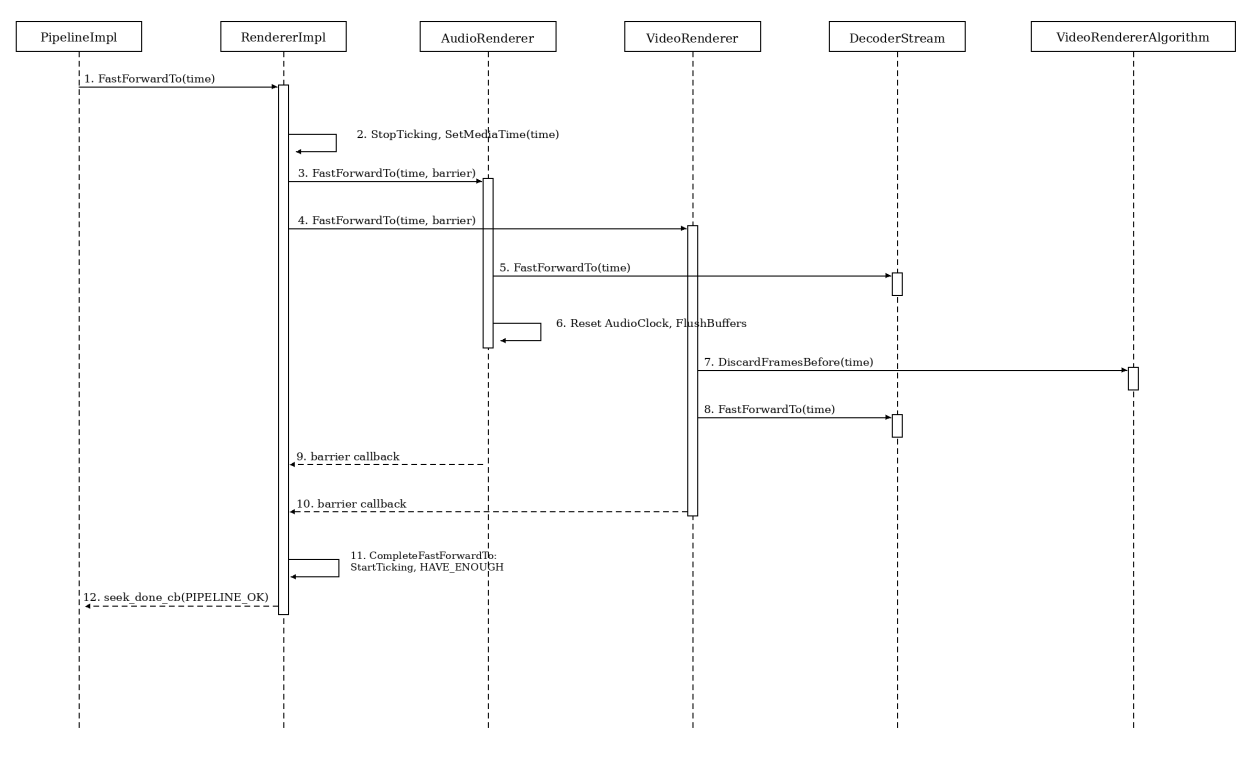
AudioRendererImpl moves the audio clock and clears stale audio buffers. VideoRendererImpl asks VideoRendererAlgorithm to remove old frames and checks whether a suitable image is already ready. If not, it requests another decoded output. A frame that began just before the target may still cover it; deleting every image with an earlier timestamp would briefly leave the renderer without the correct picture.
DecoderStream::FastForwardTo() does not call Reset(). It removes ready outputs below a threshold and remembers that threshold for an output still being processed by the decoder. If that output arrives after the new seek starts, it is discarded too. The decoder keeps the reference frames needed to decode subsequent images.
A frame timestamp marks the start of display, while the image remains current until the next frame. Discarding every output with a timestamp before the target could remove an image that still covers the requested time. The discard threshold therefore accounts for frame duration. VideoRendererAlgorithm keeps a usable image in its queue, and VideoRendererImpl waits for decoder output when no such image is ready.
An old callback may arrive while the new result is being prepared. The patch checks outputs in FrameReady and discards images that no longer fit the target time. Audio needs a different update: stale buffers must not reach the output device, and AudioClock must count from the new position. The BarrierClosure waits for both audio and video before completing the seek.
Frames in VideoRendererAlgorithm also carry render and drop counters. The patch resets them after discarding old frames because the previous values belong to another timeline position. Once the transition finishes, RendererImpl reports BUFFERING_HAVE_ENOUGH again if data is ready. WebMediaPlayerImpl::DoSeek() lowers the ready state at the start of a seek, but the fast path may never run the usual flush-and-refill cycle that would raise it again.
Checking the displayed frame
A faster seek is of little use if it leaves the old frame on screen or lands one frame off. In an editor, a one-frame error changes the export. I checked both the internal path and the image the page could read.
The patch adds three Chromium unit tests. PipelineImplTest.FastForwardSeek checks that the fast branch skips the usual Flush() and Demuxer::Seek(). RendererImplTest.SupportsFastForwardAudioVideoPausedBothHaveEnough covers a paused video with enough audio and video data. RendererImplTest.SupportsFastForwardReturnsFalseWhenWaiting checks the fallback when a renderer is waiting for data.
For image checks, I prepared synthetic H.264 and VP9 videos whose frame numbers were encoded in pixel features. After each seek, the application read the canvas image and compared it with the expected frame number. The saved set has 32,736 check rows. seeked tells the page that a seek completed; this test checks which frame was actually displayed.
Benchmark
The project benchmark uses Vue 3 and TypeScript. It loads each video into a blob: URL before a run, keeping network requests out of the measured loop. It builds a sequence of timestamps spaced by 1 / fps, pauses the video, and measures from assigning currentTime to receiving seeked with performance.now(). The next step begins after that event. The tool saves CSV data and a JSON snapshot for later analysis.
This metric measures latency to seeked. Time until pixels appear on the screen was not measured separately, so these results cannot be read as display refresh rate or codec throughput.
The main comparison used 60-second Big Buck Bunny videos at 480p and 720p, 30 frames per second, with normal and increased I-frame density. The tool supports a broader set of 30 videos, including 1080p, 2160p, and 60 fps. The table below summarizes recorded runs; the speedup depends on the video.
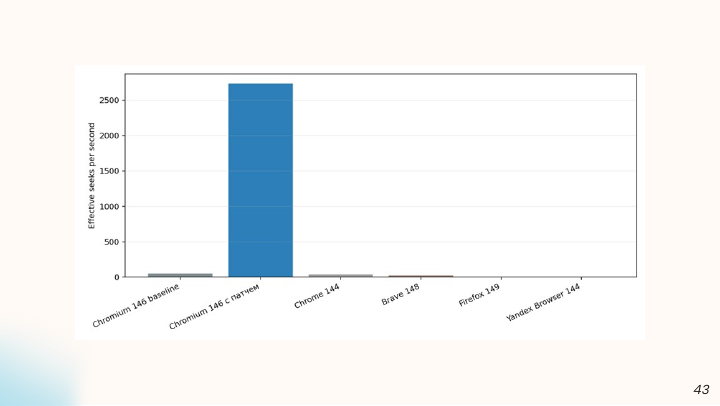
The test machine ran Ubuntu 25.10 on an AMD Ryzen AI 9 HX 370 with 32 GB RAM and an NVIDIA RTX 5070. To measure the patch, I compared two builds of Chromium 146, one unmodified and one patched. Chrome, Brave, Firefox, and Yandex Browser results provide context; they use different engine versions and do not always have the same number of measurements.
Results
In the saved summary, both Chromium builds have 7,204 measured seeks:
| Metric | Chromium 146 without patch | Chromium 146 with patch |
|---|---|---|
| Median seek time | 6.8 ms | 0.3 ms |
| Mean seek time | 19.85 ms | 0.37 ms |
| 95th percentile | 69 ms | 1 ms |
| Calculated operation rate | 50/s | 2,734/s |
The median fell by a factor of 22.7. The calculated operation rate is the number of seeks divided by their total measured time. The figure of 2,734 operations per second describes benchmark throughput; it does not mean that many images reached a monitor. The unpatched build’s mean is much higher than its median because some seeks were particularly expensive. After the patch, mean and median are close.
Individual videos show a wider difference. At 480p with normal keyframe density, the unpatched median was 28.0 ms, compared with 0.3 ms after the patch. With ten times as many I-frames, the unpatched build fell to 3.6 ms while the patched build stayed near 0.3 ms. At 720p, the pairs were 35.6 and 0.3 ms for a normal GOP, and 4.8 and 0.3 ms with more frequent I-frames. A nearby keyframe makes the repeated decoding in the standard path cheaper.
These numbers describe the saved videos, builds, and test machine. They do not imply that every currentTime assignment in Chrome becomes 22.7 times faster. The fast branch runs only after its checks pass. Long jumps and waits for data still take the standard path, and each step still incurs browser event, decoding, synchronization, and display costs.
Limits and materials
The patch targets short forward moves in regular src playback through FFmpegDemuxer. It does not optimize MSE or ChunkDemuxer, backward seeking, or distant jumps. The 5- and 2-second demuxer windows are engineering heuristics. Tuning them would need another experiment with more varied files.
Frame checks covered H.264 and VP9. AV1, HEVC, and different hardware decoders need additional runs because their behavior when decoder state is preserved may differ. I did not profile the hardware decode path separately.
The project repository contains the C++ changes, unit tests, benchmark, and summary data. The original problem is tracked in Chromium issue 418456081. Measurements came from a Chromium build with the patch; they do not describe the performance of a regular installed Chrome build.
Materials:
- Presentation (PDF): media pipeline diagrams, code excerpts, and benchmark plots.
- Chromium code review: the proposed change and discussion.
- Code, tests, and benchmark: sources for reproducing the experiment.